Visual tour of the Patterns tab
Every control in the Patterns tab, labelled. Preset chips, knobs, steady speed, the phase timeline, and what each one does.
This article is a labelled tour of the Patterns tab. If you prefer text, the same content is in How to pick a pattern preset, Building your own pattern, and Chaining patterns into a longer session.
The full tab
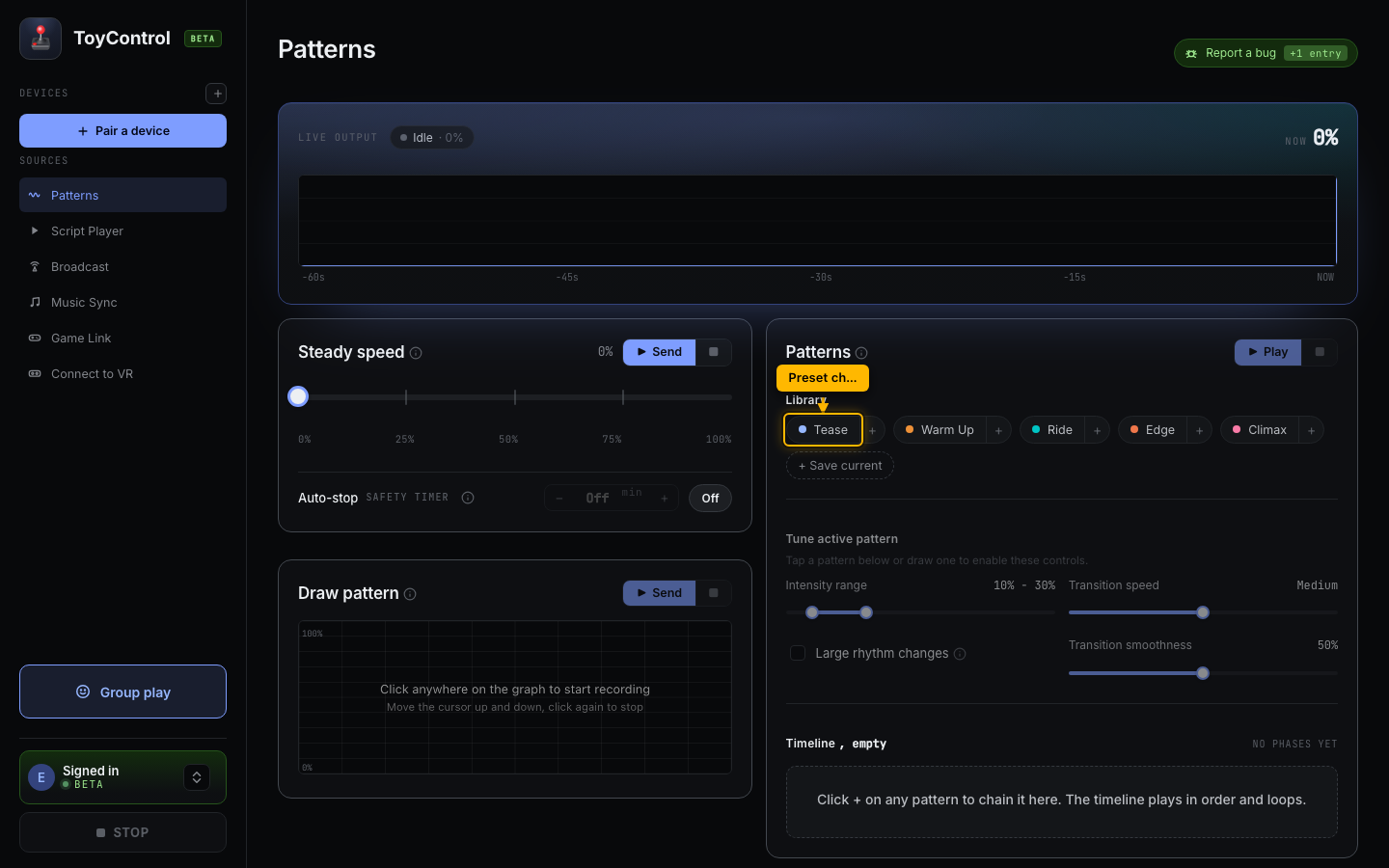
Three regions, from top to bottom:
- Preset chips. Tease, Warm Up, Ride, Edge, Climax. Click a chip to load that preset's settings.
- The three knobs. Intensity range (min and max), Rhythm (how often the pattern picks a new speed), Smoothness (jumps vs ramps).
- Steady speed. A single-slider option for constant-speed sessions.
Preset chips
The five chips at the top apply a curated combination of the three knobs:
| Preset | What it feels like |
|---|---|
| Tease | Gentle, varied, slow. Long teasing sessions. |
| Warm Up | Builds from low to mid. Starting a session. |
| Ride | Steady mid-range with mild variation. |
| Edge | Big swings between low and high. |
| Climax | Fast and high. The final stretch. |
See How to pick a pattern preset for when to use each.
The three knobs
Below the chips, three controls let you tune your own pattern:
- Intensity range has two sliders, min and max. Together they define the band the pattern oscillates within. A wide range (10-90) means lots of variation; a narrow range (40-60) means consistent middle.
- Rhythm controls how often the pattern picks a new target value. Slower rhythm = each beat lasts longer. Faster = more change per second.
- Smoothness controls how the pattern transitions. 0% means hard jumps (jarring); 100% means slow ramps (teasing).
See Building your own pattern for sample combinations.
Large rhythm changes
A toggle below the knobs. When on, the pattern alternates between the top 20% and bottom 20% of your intensity range instead of randomising across the full range. The result is dramatic high-low swings.
Turn it on for edging sessions. Turn it off for natural variation.
Steady speed
A single slider with a Send button. Sets a constant speed and runs the toy at that level until you stop. Useful for warm-ups, sustained sessions, or as the start of a timeline.
The phase timeline (below)
Below the steady-speed section is the phase timeline. Add presets in order, each plays for a set length, and ToyControl crossfades between them over 30 seconds.
A simple 30-minute session:
- Tease for 5 minutes
- Warm Up for 10 minutes
- Edge for 10 minutes
- Climax for 5 minutes
Click each chip with the duration set, and ToyControl chains them. See Chaining patterns into a longer session.
Play and stop
Each section has its own play button. In the Patterns card, Play runs the current knob settings, and the button changes to Send preset once you pick a preset chip (Tease, Warm Up, etc.). The Steady speed card has a Send button that holds whatever value the slider is at. Play timeline plays your queued phases.
The big STOP at the bottom of the sidebar always works. See The Stop button and pause behavior.
What the tab does not have
Things that intentionally are not in the Patterns tab:
- Script playback. That lives in Script Player.
- Video. Local video playback is now part of Script Player; see Video Player for the feature page.
- Game Link / VR. Those are separate source tabs.
Patterns is the simplest source. No video, no script, no external input. The session is built from the controls on this one tab.